|
|
| (ei näidata sama kasutaja 39 vahepealset redaktsiooni) |
| 1. rida: |
1. rida: |
| ===Sissejuhatus===
| | Paigaldamisel on lähtutud oracle.com juhtumist |
|
| |
|
| iAS 10.1.2 infrastruktuur koosneb kahest osast, mis sisaldavad selliseid komponente
| | * 6.23 Installing Oracle Identity Management Components Only (Including Oracle Internet Directory) - http://download.oracle.com/docs/cd/B14099_19/linux.1012/install.1012/install/infra.htm#BABJAADB |
|
| |
|
| OIM - Oracle Indentity Management
| | Märkust: pilt puudub, aga OCA puhul on kasutatud väärtusi '* specify oca distignuished name - typical dn, CN - avalik.loo, OU - tyhi, O - portaal, C - Estonia' |
|
| |
|
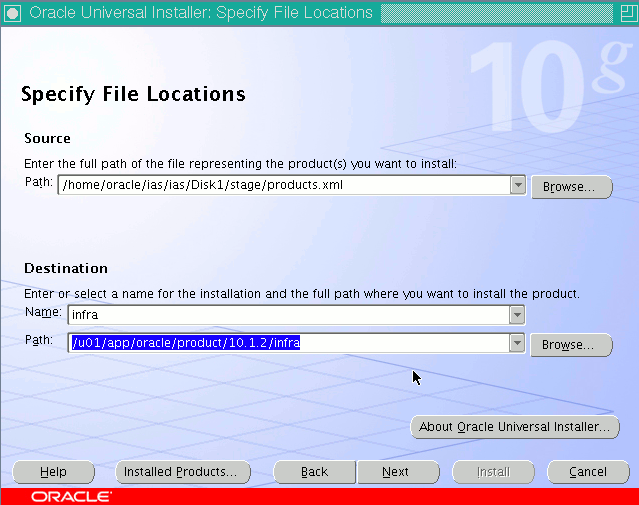
| * OID - Oracle Internet Directory | | * Installer tuleb käivitada 'linux32 bash' shellist ja ilma ORC* keskkonnamuutujateta, näitame installatsiooni nime ning kataloogitee |
| * SSO - OracleAS Single Sign-On | |
| * DAS - Oracle Delegated Administration Services
| |
| * DIP - Oracle Directory Integration and Provisioning
| |
| * OCA - OracleAS Certificate Authority
| |
|
| |
|
| OracleAS Metadata Repository
| | $ ./runInstaller |
|
| |
|
| * Product metadata - sisaldab baasi skeeme rakenduskihi Portal ja Wireless komponentide kohta
| | [[Pilt:Ias-infra-rac-1.gif]] |
| * OID Metadata - sisaldab skeeme infrastruktuuri OID, SSO ja OCA komponentide kohta
| |
| * Management metadata - sisaldab DCM (Distributed Configuration Management) kohta
| |
|
| |
|
| iAS komponente saab paigaldada
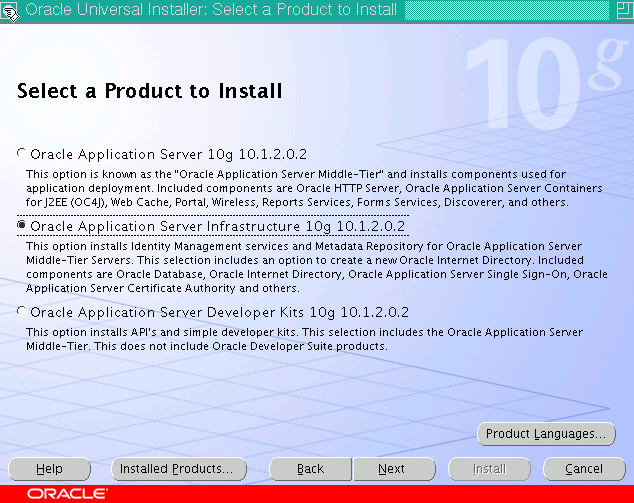
| | * Valime paigaldatava produkti, Oracle Application Server Infrastructure |
|
| |
|
| * erinevates mahtudes, st jättes osa komponente paigaldamata kui nendega seotud funktsionaalsust ei ole tarvis
| | [[Pilt:Ias-infra-rac-2.gif]] |
| * paigaldada mitmes eksemplaris eesmärgiga tõsta süsteemi jõudlust ning redundantsust
| |
|
| |
|
| Käesolevas tekstis esitatakse järgnevus kuidas paigaldada iAS'i kõik komponendid kasutades välist Oracle 10R2 RAC ASMseadistuses andmebaasi ning sealjuures komponendid paigatakse 2008 aasta keskpaigas olemasolevate paikadega.
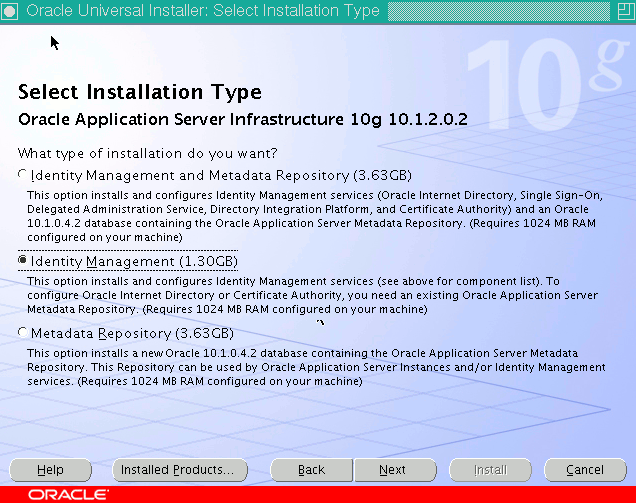
| | * Valime välja installatsiooni tüübi 'Identity Management' |
|
| |
|
| * 10R2 RAC ASM baas - 10.2.0.4.0
| | [[Pilt:Ias-infra-rac-3.gif]] |
| * 10R1 iAS - 10.1.2.3.0
| |
|
| |
|
| Järgneva eelduseks on et on olemas
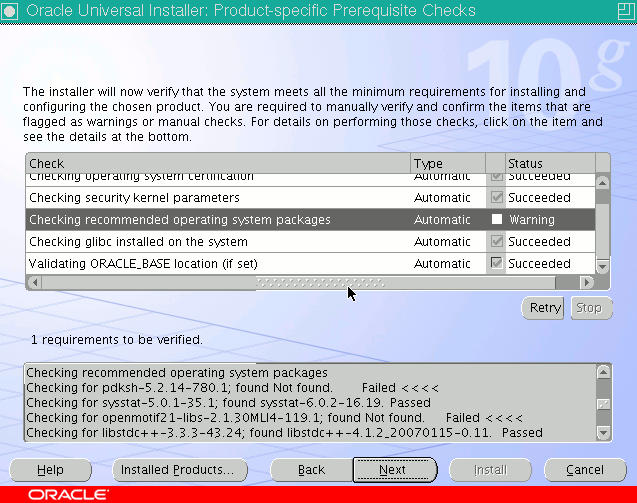
| | * Installer sooritab kontrollid, pdksh puudumist võib SLES10 puhul ignoreerida, lisada käsitsi linnuke ja edasi |
|
| |
|
| * paigatud SLES10 SP1 64bit operatsioonisüsteem
| | [[Pilt:Ias-infra-rac-4.gif]] |
| * 10R2 RAC ASM seadistuses andmebaas 10.2.0.4.0
| |
|
| |
|
| Kõik iAS 10.1.2 tarkvara tuleb 64bit operatsioonisüsteemi puhul käivitada
| | * Kinnitada, et on olemas juurkasutaja kasutamise võimalus |
|
| |
|
| linux32 bash
| | [[Pilt:Ias-infra-rac-5.gif]] |
|
| |
|
| shellist. Seda kas shell on õige saab shelli töötamise ajal küsida
| | * Valida millised komponendid paigaldatakse |
|
| |
|
| $ arch
| | * Oracle HTTP Server |
| x86_64
| | * Oracle Application Server Containers for J2EE |
| $ linux32 bash
| | * Oracle Internet Directory |
| $ arch
| | * Oracle Application Server Single Sign-On |
| i686
| | * Oracle Application Server Delegated Administration Services |
| | * Oracle Application Server Directory Integration and Provisioning |
|
| |
|
| ===Protseduuri ülevaade===
| | [[Pilt:Ias-infra-rac-6.gif]] |
|
| |
|
| Tarkvara paigaldamine toimub sellises järjekorras
| | * Valida pordid |
|
| |
|
| * MRCA (Metadata Repository Configuration Assistant) abil laaditakse olemasolevasse andmebaasi (ingl. k. existing database) MR skeemid, kasutades MRCA versiooni 10.1.2.0.3.
| | [[Pilt:Ias-infra-rac-7.gif]] |
| * Paigaldatakse infrastruktuuri 10.1.2.0.2 komponendid.
| |
| * Paigaldatakse rakenduskihi 10.1.2.0.2 komponendid.
| |
| * Paigatakse infrastruktuur versioonile 10.1.2.3.0
| |
| * Paigatakse rakenduskiht versioonile 10.1.2.3.0
| |
| * Paigatakse metadata repositori versioonile 10.1.2.3.0
| |
| | |
| Kusjuures
| |
| | |
| * kasutaja oracle kodukataloog on /home/oracle
| |
| * rakenduste kataloogid asuvad kataloogis /u01/app/oracle/product/10.1.2
| |
| * inventory kataloog on /u01/app/oracle/oraInventory
| |
| | |
| ===MRCA paigaldamine===
| |
| | |
| MRCA abil MR skeemide laadimiseks olemasolevasse 10R2 andmebaasi tuleb teha sellised ettevalmistused, numbrid viitava Metalink'i (http://metalink.oracle.com/) nootidele, neile ligipääsuks peab olema Metalink süsteemis kasutada kasutaja
| |
| | |
| * http://download.oracle.com/docs/cd/B14099_19/sol.1012/repca.1012/repca/toc.htm - Oracle® Application Server Metadata Repository Creation Assistant User's Guide
| |
| * 431665.1 - How to Obtain the Latest MRCA Information
| |
| * 362983.1 - MRCA 10.1.2.0.3 and Oracle Database 10g Release 2 (10.2)
| |
| | |
| Kasutada MRCA (Metadata Repository Creation Assistant) versiooni 10.1.2.0.3, http://www.oracle.com/technology/software/products/ias/htdocs/101202.html
| |
| | |
| $ cksum as_linux_x86_mrca_101203.cpio
| |
| 1961190085 480973824 as_linux_x86_mrca_101203.cpio
| |
| | |
| Pakime MRCA paigaldusmaterjali lahti
| |
| | |
| $ cpio -dmvi < as_linux_x86_mrca_101203.cpio
| |
| | |
| MRCA kasutamiseks tuleb esmalt MRCA ise paigaldada, nt kataloogi
| |
| | |
| /u01/app/oracle/product/10.1.2/mrca
| |
| | |
| Veenduge, ega Oracle'ga seatud keskkonnamuutujaid ei ole kirjeldatud, ega esine vatavaid teid PATH'is
| |
| | |
| $ env | grep ORA*
| |
| $ echo $PATH
| |
| | |
| Näiteks sellise skriptiga /home/oracle/system/env.sh saab nad eemaldada
| |
| | |
| unset ENV
| |
| unset ORA_CRS_HOME
| |
| unset ORA_DB_HOME
| |
| unset ORACLE_SID
| |
| unset ORA_NLS10
| |
| unset ORACLE_BASE
| |
| unset ORA_IAS_HOME
| |
| unset ORACLE_HOME
| |
| unset LD_LIBRARY_PATH
| |
| export PATH=/usr/local/bin:/usr/bin:/usr/X11R6/bin:/bin:/usr/games:/opt/gnome/bin:/usr/lib/mit/bin:/usr/lib/mit/sbin
| |
| unset CLASSPATH
| |
| unset TNS_ADMIN
| |
| unset AGENT_HOME
| |
| unset ORA_ASM_HOME
| |
| unset ORACLE_HOSTNAME
| |
|
| |
|
| ning öelda
| | * Hoidla asukoht |
|
| |
|
| $ . ./system/env.sh
| | [[Pilt:Ias-infra-rac-8.gif]] |
|
| |
|
| Ja käivitada installer
| | * OID parameetrid, näiteks |
|
| |
|
| $ ./runInstaller
| | * dc=loomaaed,dc=tartu,dc=ee |
| *************************************************************** | |
| The following files should not be present :
| |
| /etc/profile.d/oracle.csh
| |
| /etc/profile.d/oracle.sh
| |
| /etc/profile.d/alljava.csh
| |
| /etc/profile.d/alljava.sh
| |
| Please remove the above files or move them to .bak
| |
| Remove the ". ./.oracle" entries from /home/oracle/.profile
| |
| Logout and login to reset the Shell environment.
| |
| ***************************************************************
| |
| Do you want to continue anyway: [y/n]
| |
| y
| |
| For SuSE, you are required to login as root and run the patch present in
| |
| the utils/3167528/ and utils/4015045 directory
| |
| Enter y if you have allready installed the patch
| |
| Enter n to exit the installer and run the patch
| |
| Is the patch for bug # 3167528 and 4015045 run : [y/n] :
| |
| y
| |
|
| |
|
| Kui kõnealuses arvutis on MRCA installer esimene Oracle programm, siis küsitakse inventory asukohta
| | [[Pilt:Ias-infra-rac-9.gif]] |
|
| |
|
| [[Pilt:Mrca-inst-1.gif]]
| | OCA võtme pikkus |
|
| |
|
| ning moodustatakse kaks faili
| | [[Pilt:Ias-infra-rac-key-lenght.gif]] |
|
| |
|
| [[Pilt:Mrca-inst-2.gif]]
| | OCA ligipääs |
|
| |
|
| # /u01/app/oracle/oraInventory/orainstRoot.sh
| | [[Pilt:Ias-infra-rac-oca-admin-password.gif]] |
| Creating the Oracle inventory pointer file (/etc/oraInst.loc)
| |
| Changing groupname of /u01/app/oracle/oraInventory to oinstall.
| |
|
| |
|
| Seejärel tuleb näidata millisesse kataloogi tarkvara paigaldatakse
| | ias_admin ligipääs |
|
| |
|
| [[Pilt:Mrca-inst-3.gif]] | | [[Pilt:Ias-infra-rac-10.gif]] |
|
| |
|
| Keelevalikud, installeri kasutajaliidese keele osas
| | Install teatab probleemist, aga kui samal ajal ütleb arvuti nii, siis on kõik ok ning valida Continue |
|
| |
|
| [[Pilt:Mrca-inst-4.gif]]
| | $ /u01/app/oracle/product/10.1.2/infra/opmn/bin/opmnctl status |
| | |
| Seejärel sooritab installer standarse operatsioonisüsteemi parameetrite kontrolli, mille tulemus võiks olla näiteks selline
| |
| | |
| Checking operating system certification | |
| Expected result: One of redhat-2.1,redhat-3,redhat-4,SuSE-9,SuSE-8,UnitedLinux-1.0
| |
| Actual Result: SuSE-9
| |
| Check complete. The overall result of this check is: Passed
| |
| =======================================================================
| |
|
| |
| Checking security kernel parameters
| |
| Checking for shmall=2097152; found shmall=2097152. Passed
| |
| Checking for msgmnb=65535; found msgmnb=65536. Passed
| |
| Checking for semmns=32000; found semmns=32000. Passed
| |
| Checking for semopm=100; found semopm=100. Passed
| |
| Checking for msgmni=2878; found msgmni=16. Failed <<<<
| |
| Checking for shmmax=2147483648; found shmmax=3294967296. Passed
| |
| Checking for hardnofiles=65536; found hardnofiles=65536. Passed
| |
| Checking for VERSION=2.6.5-7.97; found VERSION=2.6.16.60-0.27-default. Passed
| |
| Checking for file-max=131072; found file-max=131072. Passed
| |
| Checking for semmsl=256; found semmsl=1250. Passed
| |
| Checking for semmni=142; found semmni=256. Passed
| |
| Checking for msgmax=8192; found msgmax=65536. Passed
| |
| Checking for shmmni=4096; found shmmni=4096. Passed
| |
| Checking for softnofiles=4096; found softnofiles=65536. Passed
| |
| Check complete. The overall result of this check is: Failed <<<<
| |
| Problem: The security parameters in the kernel do not meet the minimum requirements (see above).
| |
| Recommendation: Perform operating system specific instructions to update the kernel parameters, namely BIT_SIZE and noexec_user_stack.
| |
| =======================================================================
| |
|
| |
| Checking recommended operating system packages
| |
| Checking for pdksh-5.2.14-780.1; found Not found. Failed <<<<
| |
| Checking for sysstat-5.0.1-35.1; found sysstat-8.0.4-1.4. Passed
| |
| Checking for openmotif21-libs-2.1.30MLI4-119.1; found Not found. Failed <<<<
| |
| Checking for libstdc++-3.3.3-43.24; found libstdc++-4.1.2_20070115-0.21. Passed
| |
| Checking for make-3.80-184.1; found make-3.80-202.2. Passed
| |
| Checking for binutils-2.15.90.0.1.1-32.5; found binutils-2.16.91.0.5-23.31. Passed
| |
| Checking for gcc-3.3.3-43.24; found gcc-4.1.2_20070115-0.21. Passed
| |
| Checking for gcc-c++-3.3.3-43.24; found gcc-c++-4.1.2_20070115-0.21. Passed
| |
| Checking for gnome-libs-1.4.1.7-671.1; found Not found. Failed <<<<
| |
| Checking for gnome-libs-devel-1.4.1.7-671.1; found Not found. Failed <<<<
| |
| Checking for libstdc++-devel-3.3.3-43.24; found libstdc++-devel-4.1.2_20070115-0.21. Passed
| |
| Check complete. The overall result of this check is: Failed <<<<
| |
| Problem: Some recommended packages are missing (see above).
| |
| Recommendation: You may actually have installed packages which have obsoleted these, in which case you can successfully continue with the i
| |
| =======================================================================
| |
| | | |
| Checking glibc installed on the system | | Processes in Instance: infra.portaal-ias1a.avalik.loo |
| Expected result: 2.3.3-98.28
| | -------------------+--------------------+---------+--------- |
| Actual Result: 2.4-31.54 | | ias-component | process-type | pid | status |
| Check complete. The overall result of this check is: Passed | | -------------------+--------------------+---------+--------- |
| ======================================================================= | | DSA | DSA | N/A | Down |
| | | LogLoader | logloaderd | N/A | Down |
| Validating ORACLE_BASE location (if set) | | dcm-daemon | dcm-daemon | N/A | Down |
| Check complete. The overall result of this check is: Passed | | HTTP_Server | HTTP_Server | N/A | Down |
| ======================================================================= | | OID | OID | N/A | Down |
|
| |
|
| Siit on näha järgmised probleemid
| | [[Pilt:Ias-infra-rac-11.gif]] |
|
| |
|
| * Checking for msgmni=2878; found msgmni=16. Failed <<<< - tuleb seada kernel.msgmni parameeter
| | Abilised töötavad |
| * mõni pakett on puudu - neid võib praktiliselt ignoreerida kuna me kasutame tegelikult SLES10 operatsioonisüsteemi
| |
|
| |
|
| Peale parameetri seadmist käsuga
| | [[Pilt:Ias-infra-rac-12.gif]] |
|
| |
|
| # sysctl -w kernel.msgmni=2878
| | Ning lõpuks öeldakse, et on valmis. |
|
| |
|
| ning faili /etc/sysctl.conf lisades.
| | Vahepeal küsiti skriptide asukohta, selleks öelda |
|
| |
|
| Peale installeri töö katkestamist ja enne uuesti käivitamist tuleb vahepeal eemaldada failisüsteemist tekkinud kataloog
| | # /u01/app/oracle/product/10.1.2/infra/root.sh |
| | | Running Oracle10 root.sh script... |
| $ rm -rf /u01/app/oracle/product/10.1.2/mrca
| |
| | |
| Küsitakse, kas installeri paigaldamise järel asutakse koheselt andmebaasi ettevalmistama, vastame eitavalt, et protseduurid lahus hoida
| |
| | |
| [[Pilt:Mrca-inst-5.gif]]
| |
| | |
| Näidatakse tehtud otsustusi
| |
| | |
| [[Pilt:Mrca-inst-6.gif]]
| |
| | |
| Ja toimub tarkvara paigaldamine
| |
| | |
| [[Pilt:Mrca-inst-7.gif]]
| |
| | |
| Paigalduse lõpul tuleb käivitada juurkasutajana skript
| |
| | |
| # /u01/app/oracle/product/10.1.2/mrca/root.sh | |
| Running Oracle9 root.sh script... | |
| \nThe following environment variables are set as: | | \nThe following environment variables are set as: |
| ORACLE_OWNER= oracle
| | ORACLE_OWNER= oracle |
| ORACLE_HOME= /u01/app/oracle/product/10.1.2/mrca
| | ORACLE_HOME= /u01/app/oracle/product/10.1.2/infra |
|
| |
| Enter the full pathname of the local bin directory: [/usr/local/bin]: /usr/local/mrca/bin
| |
| Creating /usr/local/mrca/bin directory...
| |
| Copying dbhome to /usr/local/mrca/bin ...
| |
| Copying oraenv to /usr/local/mrca/bin ...
| |
| Copying coraenv to /usr/local/mrca/bin ...
| |
| | | |
| \nCreating /etc/oratab file... | | Enter the full pathname of the local bin directory: [/usr/local/bin]: /usr/local/ias-infra/bin |
| Adding entry to /etc/oratab file...
| |
| Entries will be added to the /etc/oratab file as needed by
| |
| Database Configuration Assistant when a database is created
| |
| Finished running generic part of root.sh script.
| |
| Now product-specific root actions will be performed.
| |
| Running Oracle9 root.sh script...
| |
| \nThe following environment variables are set as:
| |
| ORACLE_HOME= /u01/app/oracle/product/10.1.2/mrca
| |
| Finished running generic part of root.sh script.
| |
| Now product-specific root actions will be performed.
| |
|
| |
|
| [[Pilt:Mrca-inst-8.gif]]
| | Probleemid |
|
| |
|
| Teatatakse, et paigaldus on lõppenud
| | * OCA agent hävib ja selle vastu aitab failist /u01/app/oracle/product/10.1.2/infra/oca/bin/cminst eemaldada LD_ASSUME_KERNEL rida. |
|
| |
|
| [[Pilt:Mrca-inst-9.gif]]
| | Tulemusena ütleb arvuti |
|
| |
|
| Installeri sulgemine toimub justkui ebaloomulikult öeldes Exit, aga nii ta on
| | The following J2EE Applications have been deployed and are accessible at the URLs listed below. |
| | Use the following URL to access the Oracle Enterprise Manager 10g Application Server Control Console : |
| | http://portaal-ias1a.avalik.loo:1156 |
| | The following information is available in: |
| | /u01/app/oracle/product/10.1.2/infra/install/setupinfo.txt |
| | Oracle Application Server 10g (10.1.2.0.2) Usernames and Default password information: |
| | Please refer to Oracle Application Server 10g Administrator Guide for more information. |
| | OCA osa asub |
| | :6600/oca/user ja /oca/admin |
| | Install Type: Identity Management |
| | Configured Components: Oracle HTTP Server | Oracle Application Server Containers for J2EE | Oracle Internet Directory | Oracle Application Server Single Sign-On | Oracle Application |
| | Server Delegated Administration Service | Oracle Application Server Directory Integration and Provisioning | |
| | Oracle Internet Directory has been configured for an existing Metadata Repository using this connection: portaal-ias1a-vip.avalik.loo:1521:portdba.avalik.loo. |
| | Use the following URL to access the Oracle HTTP Server and the Welcome Page: |
| | http://portaal-ias1a.avalik.loo:7777 |
| | ----------------------------------------- |
| | Use the following URL to access the Oracle Enterprise Manager Application Server Control: |
| | http://portaal-ias1a.avalik.loo:1156 |
| | Instance Name: infra.portaal-ias1a.avalik.dloo |
| | Installation of Oracle Application Server Infrastructure is Complete. Please note that any URLs created in this install may not be functional immediately. |
|
| |
|
| [[Pilt:Mrca-inst-10.gif]]
| | Lõpus esitatud teate tekst on kirjas samuti Oracle binari home'is failis |
|
| |
|
| ===MRCA abil MR skeemide laadimine olemasolevasse andmbaasi===
| | $ORACLE_HOME/install/setupinfo.txt |
|
| |
|
| | Ning kasutusele võetud portide nimekiri on failis |
|
| |
|
| MRCA sisaldab vahendit olemasoleva andmebaasi sobivuse kontrollimiseks, sedasi
| | $ORACLE_HOME/install/portlist.ini |
| | |
| $ cd /u01/app/oracle/product/10.1.2/mrca/repca/prereq | |
| $ ./DBPrereqChecker -DBHOST baas-vip-loomaaed.tartu.ee -DBPORT 1521 -DBNAME loomdba.loomaaed.tartu.ee -SYSPWD xxx -LOGDIR /home/oracle/mrca-log
| |
| Starting validation DatabasePrerequisite
| |
| Database Problems
| |
| The following problems were found with the specified database:
| |
| The aq_tm_processes initialization parameter needs to be greater than or equal to 1. Please correct it and try again.
| |
|
| |
| The db_cache_size initialization parameter needs to be set to 144MB or a greater value. Please correct it and try again.
| |
|
| |
| The shared_pool_size initialization parameter needs to be set to 175MB or a greater value. Please correct it and try again.
| |
|
| |
| The java_pool_size initialization parameter needs to be set to 120MB or a greater value. After changing the value of the parameter, restart the database for the new value to take effect.
| |
| | |
| Selliste probleemide korrigeerimiseks tuleb
| |
| | |
| * ..
| |
| | |
| Edu puhul vastatakse
| |
| | |
| Starting validation DatabasePrerequisite
| |
| Validation Succeeded -> DatabasePrerequisite
| |
| Validation check complete
| |
| | |
| MRCA kasutamine toimub selliselt
| |
| | |
| $ cd /u01/app/oracle/product/10.1.2/mrca
| |
| $ ./runRepca
| |
| | |
| [[Pilt:Mrca-rac-1.gif]]
| |
| [[Pilt:Mrca-rac-2.gif]]
| |
| [[Pilt:Mrca-rac-3.gif]]
| |
| [[Pilt:Mrca-rac-4.gif]]
| |
| [[Pilt:Mrca-rac-5.gif]]
| |
| [[Pilt:Mrca-rac-6.gif]]
| |
| [[Pilt:Mrca-rac-7.gif]]
| |
| [[Pilt:Mrca-rac-8.gif]]
| |
| | |
| ===Infrastruktuuri 10.1.2.0.2 komponentide paigaldamine===
| |
| | |
| [[Pilt:Ias-infra-rac-1.gif]]
| |
| [[Pilt:Ias-infra-rac-2.gif]]
| |
| [[Pilt:Ias-infra-rac-3.gif]]
| |
| [[Pilt:Ias-infra-rac-4.gif]]
| |
| [[Pilt:Ias-infra-rac-5.gif]]
| |
| [[Pilt:Ias-infra-rac-6.gif]]
| |
| [[Pilt:Ias-infra-rac-7.gif]]
| |
| | |
| ===Rakenduskihi 10.1.2.0.2 komponentide paigaldamine===
| |
| ===Infrastruktuuri komponentide versioonile 10.1.2.3.0 paikamine===
| |
| ===Rakenduskihti komponentide versioonile 10.1.2.3.0 paikamine===
| |
| ===Metadata repository versioonile 10.1.2.3.0 paikamine===
| |
Paigaldamisel on lähtutud oracle.com juhtumist
Märkust: pilt puudub, aga OCA puhul on kasutatud väärtusi '* specify oca distignuished name - typical dn, CN - avalik.loo, OU - tyhi, O - portaal, C - Estonia'
- Installer tuleb käivitada 'linux32 bash' shellist ja ilma ORC* keskkonnamuutujateta, näitame installatsiooni nime ning kataloogitee
$ ./runInstaller
- Valime paigaldatava produkti, Oracle Application Server Infrastructure
- Valime välja installatsiooni tüübi 'Identity Management'
- Installer sooritab kontrollid, pdksh puudumist võib SLES10 puhul ignoreerida, lisada käsitsi linnuke ja edasi
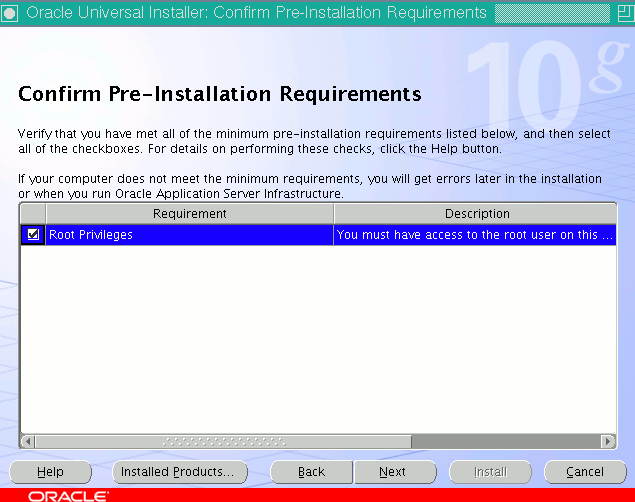
- Kinnitada, et on olemas juurkasutaja kasutamise võimalus
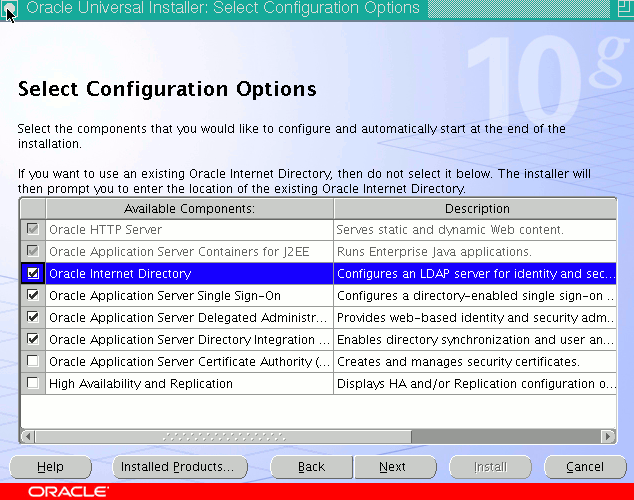
- Valida millised komponendid paigaldatakse
- Oracle HTTP Server
- Oracle Application Server Containers for J2EE
- Oracle Internet Directory
- Oracle Application Server Single Sign-On
- Oracle Application Server Delegated Administration Services
- Oracle Application Server Directory Integration and Provisioning
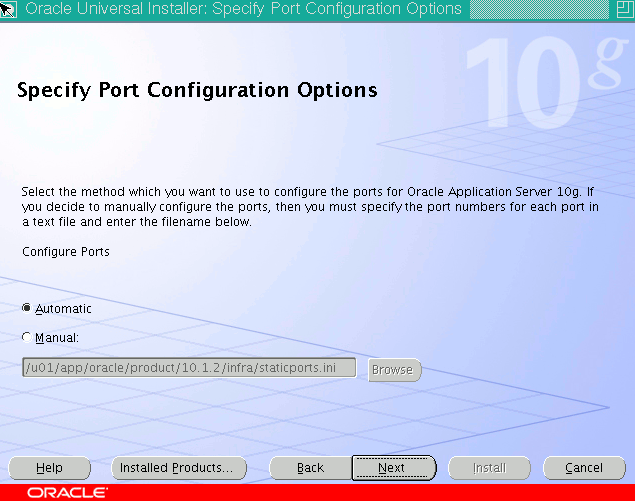
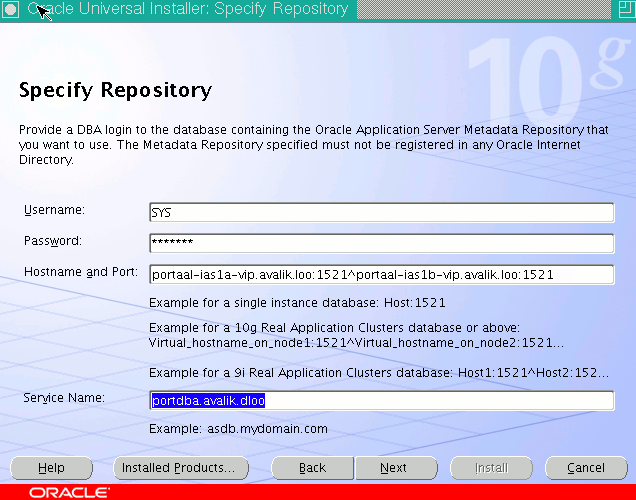
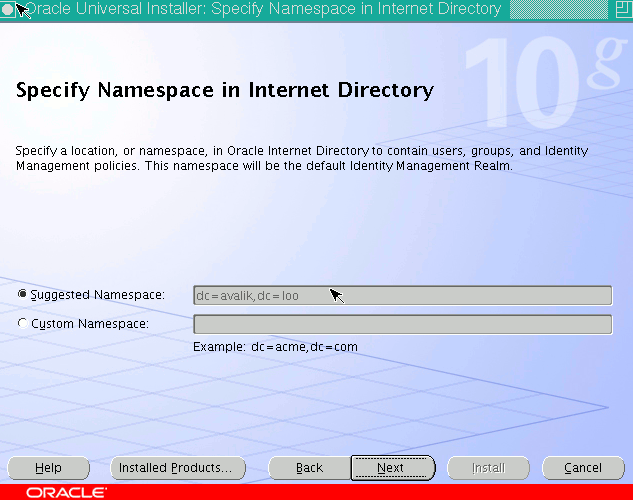
* dc=loomaaed,dc=tartu,dc=ee
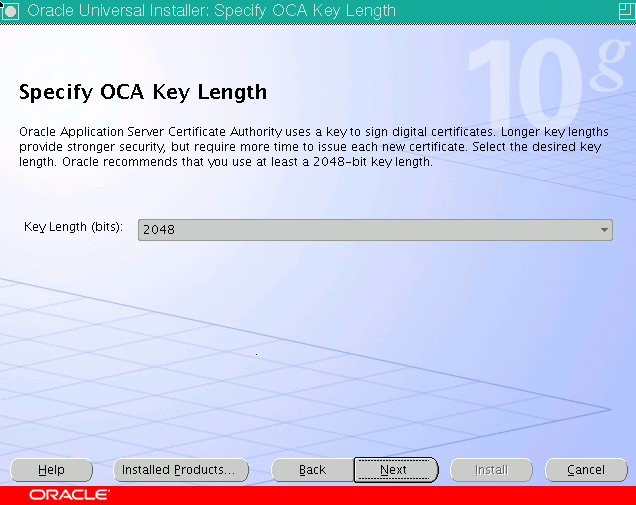
OCA võtme pikkus
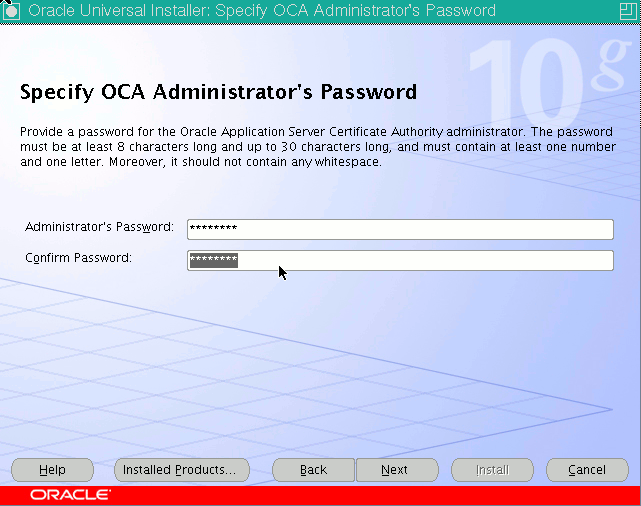
OCA ligipääs
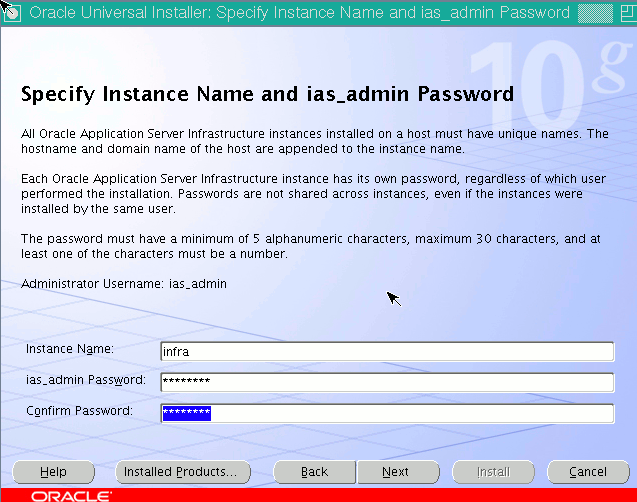
ias_admin ligipääs
Install teatab probleemist, aga kui samal ajal ütleb arvuti nii, siis on kõik ok ning valida Continue
 $ /u01/app/oracle/product/10.1.2/infra/opmn/bin/opmnctl status

 Processes in Instance: infra.portaal-ias1a.avalik.loo
 -------------------+--------------------+---------+---------
 ias-component      | process-type       |     pid | status
 -------------------+--------------------+---------+---------
 DSA                | DSA                |     N/A | Down
 LogLoader          | logloaderd         |     N/A | Down
 dcm-daemon         | dcm-daemon         |     N/A | Down
 HTTP_Server        | HTTP_Server        |     N/A | Down
 OID                | OID                |     N/A | Down
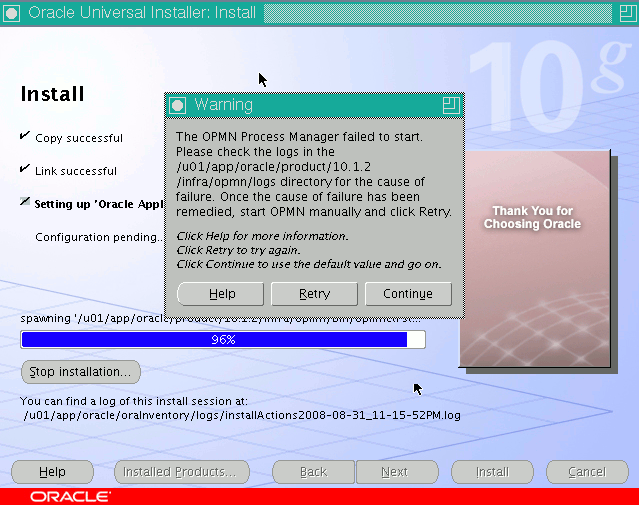
Abilised töötavad
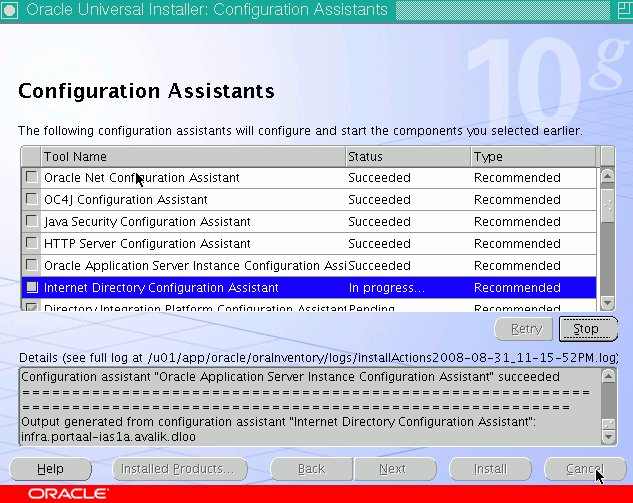
Ning lõpuks öeldakse, et on valmis.
Vahepeal küsiti skriptide asukohta, selleks öelda
 # /u01/app/oracle/product/10.1.2/infra/root.sh
 Running Oracle10 root.sh script...
 \nThe following environment variables are set as:
   ORACLE_OWNER= oracle
   ORACLE_HOME=  /u01/app/oracle/product/10.1.2/infra

 Enter the full pathname of the local bin directory: [/usr/local/bin]: /usr/local/ias-infra/bin
Probleemid
- OCA agent hävib ja selle vastu aitab failist /u01/app/oracle/product/10.1.2/infra/oca/bin/cminst eemaldada LD_ASSUME_KERNEL rida.
Tulemusena ütleb arvuti
 The following J2EE Applications have been deployed and are accessible at the URLs listed below.
 Use the following URL to access the Oracle Enterprise Manager 10g Application Server Control Console :
 http://portaal-ias1a.avalik.loo:1156
 The following information is available in:
 /u01/app/oracle/product/10.1.2/infra/install/setupinfo.txt
 Oracle Application Server 10g (10.1.2.0.2) Usernames and Default password information:
 Please refer to Oracle Application Server 10g Administrator Guide for more information.
 OCA osa asub
 :6600/oca/user ja /oca/admin
 Install Type: Identity Management
 Configured Components: Oracle HTTP Server | Oracle Application Server Containers for J2EE | Oracle Internet Directory | Oracle Application Server Single Sign-On | Oracle   Application
 Server Delegated Administration Service | Oracle Application Server Directory Integration and Provisioning |
 Oracle Internet Directory has been configured for an existing Metadata Repository using this connection: portaal-ias1a-vip.avalik.loo:1521:portdba.avalik.loo.
 Use the following URL to access the Oracle HTTP Server and the Welcome Page:
 http://portaal-ias1a.avalik.loo:7777
 -----------------------------------------
 Use the following URL to access the Oracle Enterprise Manager Application Server Control:
 http://portaal-ias1a.avalik.loo:1156
 Instance Name: infra.portaal-ias1a.avalik.dloo
 Installation of Oracle Application Server Infrastructure is Complete. Please note that any URLs created in this install may not be functional immediately.
Lõpus esitatud teate tekst on kirjas samuti Oracle binari home'is failis
$ORACLE_HOME/install/setupinfo.txt
Ning kasutusele võetud portide nimekiri on failis
$ORACLE_HOME/install/portlist.ini


